Wednesday, February 25, 2009

LG Viewty

Introduction:
The Viewty is LG’s flagship model, targeted as an all-in-one multimedia phone, stressing on the advanced camera features, camcorder and video playback options. It isn’t а direct rival of any device, but tries to target a consumers group as large as possible. It comes with the touch-screen and key-less navigation, similar to the iPhone but has a 5-megapixel camera with Xenon flash, which puts it next to the N95, K850 and other camera-dedicated phones. It isn’t а smartphone but comes with a bag full of surprises, including manual focus, 120fps video capture and DivX playback.


Design:
The first thing most will notice is the huge 3-inch widescreen with 240x400 pixels resolution and up to 262’144 colors. While it is very bright and with a very good image, we would have liked to see a sensor for controlling its brightness level, to help reducing the battery consumption. It is touch sensitive and can be pressed with any object, not only with finger as in phones like the Prada or the Armani. The sensitivity is ok but scrolling needs some getting used to – you don’t have to just sweep your finger but do as if you grab the screen and then move it up or down.

On the front there are only three hardware keys, as in the Prada and Voyager phones: Send, Clear and End. They are in the same glossy black and while inactive merge with the front panel, but when the display is operational they are illuminated in respectively green, white and red.


LG ‘Viewty’ Phone [LG-KU990] - Technical Specifications

- 5 Mega Pixel camera certified by Schneider
-Kreuznach for clear shots
- Manual Focus & Auto Focus
- Xenon light for shot in low light
- Mobile XD Engine
- 30fps VGA, 262K TFT LCD for clearer and sharper pictures and videos
- Video can be filmed endlessly according to memory capacity
- Ultra High speed video capture (120fps)
- Divx Playback (up to VGA 30fps)- H.264, H.263, MPEG4
- TV out
- HSDPA 3.6Mbps, EDGE
- WAP 2.0
- Bluetooth 1.2 (AD2P,BPP)- USB 2.0 High Speed/ Bluetooth 1.2
- PictBridge(Printer direct connect via USB cable) &BPP (via Bluetooth)
- MP3 Player


LG Viewty’s software is identical to the one of the Prada phone in some aspects, but there also are a significant amount of changes. Many things are improved to match the increased functionality yet the good look of the menus remains.

The home screen is almost empty by default. There is a line with service information on the top and in the bottom are four shortcuts: Menu, Dialing pad, Messaging and Phonebook. An option in the menu allows you to put a Clock, Calendar or both in the center of the screen. Tap anywhere in the empty space, and two animated arrows (left and right) will appear above the shortcuts; touch one of them and a menu with 9 more shortcuts will appear.


Connectivity:
One of the greatest drawbacks of the Viewty is its limited connectivity, which means it is not fully usable in the US. It is tri-band GSM/EDGE with single-band (2100MHz) UMTS/HSDPA 3.6MBps, making it suitable only for the European market.

The full HTML internet browser is definitely among the good ones on the market. Even heavy pages such as phonearena.com are not а problem, it visualizes them correctly. There are options for fullscreen, landscape or portrait orientation and for zooming out (so the whole page is visible) and then zooming in a particular part of the page, similar to the iPhone’s Safari. What we dislike is the way one moves through the page: although we are already used to operating the phone, scrolling in any direction works but is far from the iPhone, which is much more adequate.

LG KS20

Introduction:
Lately LG has been producing quite good looking and stylish phones and following this trend, they have recently added a new member to their line - LG KS20. It has a design almost the same as of a Prada phone, but with different functionality and purpose, for which the Windows Mobile 6 Professional and the built in WiFi contribute big time. If you are a fan of smartphones and beautiful designer pieces, this device will suit you just fine.
Similarly to Prada, LG have not left the box behind and have crafted it so it fits the design.


Design:
The first impression the design gives us, is that it resembles the one of a Prada phone. The materials used are the same utilized in the popular model and help in achieving that impression. Same as with the Prada, the shiny plastic surface is a fingerprint magnet and you will have to clean your phone constantly, in order for it to look good.

What characterizes phones with such functionality is that they are bigger and heavier, but not the KS20, which impresses with its compact size and light weight. Unfortunately, when you hold it in your hand, the feeling of comfort vanishes instantaneously because of the plastic, which makes it quite light and its size, which is too small for the masculine hand.


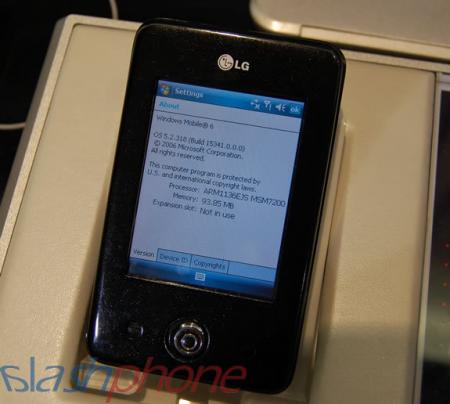
The LG KS20 is rumoured to be based on Windows Mobile 6.0, and comes with the following specs:

-Windows Mobile 6 Professional
-Size: 99.5 × 58 × 12.9 mm
-Weight: 99 g
-Memory: 128 MB ROM
-ARM1136EJS MSM7200
-2.8", 240×320 pixel, 18-bit (262.144) colour touchscreen
-GPRS/EDGE/UMTS/HSDPA/HSUPA
-800 mAh Li-Polymer battery, 3/180 hours talk/standby time
-2.0 megapixel camera with auto-focus and flash, second video calling camera
-Bluetooth, WiFi, TV-out, FM radio
-microSD card slot


Interface:
LG KS20 is a Windows Mobile 6 Professional device and as a whole, its software and possibilities are almost entirely identical to the other phones using the same operating system. Nothing will surprise you if you have previously used the OS. Therefore you should bear in mind that certain problems and positive features of theirs are valid not only for the phone or make’s models, but for the models using this operating system (WM6 Professional), too.

The people from LG have modified the interface by adding a toolbar with four shortcut buttons (Menu, Dialer, Messaging menu and in our case a Vodafone menu) in the bottom of the Home Screen, like in the PRADA and the Viewty. Their purpose is to provide fast access to Menu, Dialer, Messaging menu and in this case, Vodafone menu, thus considerately facilitating work with the device. The Menu is divided in five groups –: 1)Phone functions, 2)Vodafone menu, 3)Multimedia menu, 4)Organizer, 5)Settings. There are shortcuts to the most frequently used functions in each of them, but unfortunately adding other icons in these menus is not possible.


Connectivity:
LG KS20 is a tri-band GSM (900/1800/1900 MHz) and a single-band (2100 MHz) UMTS/HSDPA cell phone, and it can be used in the European and Asian 3G networks. Unfortunately the device can not be used everywhere in the US, because it doesn’t support the 850 MHz GSM band. On the other hand the appearance of a US version LG MS20/MS25 is expected, but there is no information on the release date.

Standard for a smartphone, WiFi and Bluetooth are available. Bluetooth is mainly used for connecting to other nearby devices, as accessories (earpieces, car-kits, multimedia devices) and for data transfer (transfer of files to/from another phone/PC). Cable connection can also be used, via the charger port.
Like all other Windows phones, you need to have ActiveSync installed on the computer to connect to it. The program will let you easily synchronize the phone (contacts, emails, organizer) with Outlook.

With WiFi you can connect to a wireless LAN network covering you, use it as an Internet source and view the shared documents (input \\name-of-computer in Internet Explorer and you will see what is shared).

Friday, February 20, 2009

Nokia N82

Introduction:
In the middle of November, the new Nokia N82 was announced. Being a 80-series model, it is not among the top-of the-line Nokia phones (90-series), which is logical as its features are very similar to the 9-month old N95. The next high-end model which will be the successor of the N95 (including the 8GB version), is expected to be presented in the first quarter of the 2008, either on CES or 3GSM expos.
The N82 is Nokia’s first cameraphone equipped with a Xenon flash, instead of a standard LED one. This is what Sony Ericsson has been using in its top cameraphones since the K800 and has proved to be the best such technology. Flashes of this type have also appeared in the recently released high-end cameraphones of Samsung (G800) and LG (Viewty).


Design:
Just a look is enough to see that the new N82 is … let’s say different. It doesn’t remind us of any previous Nokia phone, has very different style and design-language as a whole. We may characterize it as hate-it-or-like it style and as a whole it is not among the attractive phones. The entire phone’s body is made of plastic, but unfortunately there is a cheap feeling when using it, although the construction is solid. Still, the weight is pocket-friendly, which has been the idea of the manufacturer.
As usual, the camera lens and flash are located on the back side. Next to them is a small slider that opens/closes the lens cover; it is not very comfortable but we prefer it to the bulgy cover used in the Samsung G800 for example.


So the specs for Nokia N82 should be correct as well. They include:

-Quad band GSM, UMTS and HSDPA connectivity
-5 mpx camera with Carl Zeiss lens
-Autofocus, up to 20 x digital zoom. Real Xenon flash
-30 fps VGA video capture
-Secondary CIF camera
-2.4″QVGA 240×320, 16M colors screen
-Built-in GPS
-FM Radio
-TV-Out
-Wi-Fi, Bluetooth 2.0
-100 MB built-in memory
-Micro SD memory card slot
-Dimensions: 112 x 50.2 x 17.3 mm
-Weight: 120 g [Target]
-Talk time: GSM: 280min, WCDMA: 180min (Target)
-Standby time: GSM: 270hrs WCDMA: 250hrs (Target)


Interface:
Nokia N82 is using Symbian v9.2 Operating System and S60 Interface 3rd edition with Feature Pack 1, which is what other contemporary smartphones of the brand use (N95 8GB, N81 (8GB) ).
The banner at the top of the homescreen houses all the service information. Just below these is a row of 6 shortcuts which can be personalized to suit you best and the rest of the display is used for “notifications”. This is where missed calls, upcoming tasks (or To-Do in the calendar), received messages are displayed, as well as the music player status (the song that’s played at the moment). Shortcut to a global Search, that will seek in the whole phone's memory, which we find very handy is situated here also. Located at the bottom of the screen are the two software buttons which can also be personalized from the Settings menu.


Connectivity:
Just as the Nokia N95, the N82 cannot really be considered a global phone due to its crippled 3G support. Although the quad-band GSM/EDGE receiver allows it to be used worldwide, the 3G UMTS/HSDPA will be limited only to regions with 2100 MHz coverage (Europe and Asia).

There are three methods for local connectivity: Bluetooth (v2.0 with EDR), WiFi and USB. Bluetooth will most commonly be used for connecting to other mobile devices or phone accessories; WiFi is most convenient for connecting to local wireless networks and using them as a source of Internet; while the USB is the preferable connection to a computer. Once the microUSB cable is attached, the phone asks you to select one of four connection methods:

1. PC Suite used for synchronizing the Contacts, Calendar entries (To-Do) and the Notes with most popular systems: Outlook (Express), Lotus Organizer, Lotus Notes, Vista Contacts.

2. Data transfer opens the memory card (if present) as mass storage device, for easy and fast transfer of files.

3. Image print is used with compatible printers, to print images without a computer being necessary.

4. Media player is used for more comfortable transfer of multimedia files to and from the phone.

Samsung BlackJack II

Introduction:
The original BlackJack was seen by many as an outstanding smartphone but had some major disadvantages, such as the battery life. Samsung went back to the drawing board and cooked up the BlackJack II with the target of improving on the original design. Looking over the specifications, it’s easy to tell that performance and features were targeted while the design went relatively unchanged. The market is full of smartphones and multimedia phones that offer a wide list of features coupled with great strong performance, such as the Motorola Q9h or the AT&T Tilt, so the BlackJack II has already got its work cut out for it.


Design:
Compared to the BlackJack, the BlackJack II’s layout is very similar with only a few changes made. The soft-touch finish is gone and has been replaced by plastic which still offers just the right touch of grip. The keypad is as cramped as ever but surprisingly easy to use. Numbers have all been grouped together instead of being placed in every other row. The navigation buttons above have the exact same layout but are now flush with the display making it very hard telling them apart. We’ve had instances where the wrong button was pressed. The scroll wheel on the side is combined with the D-pad to create the jog wheel which made scrolling through long emails or webpages very easy. Overall the layout is very intuitive and easy to use even though everything is so cramped. It’s even easy to hold as the bulge on the back rest on your figures adding extra support.


The specs for Samsung i780 include:

-HSDPA/WCDMA/GSM/GPRS/EDGE conenctivity (900/1800/1900 +2.1GHz)
-QWERTY keyboard
-Full Touch Screen
-3.2 megapixel camera
-front camera for video calls
-2.55″ 320×320 px 65K color display
-Built-in GPS with Navigation client
-Bluetooth 2.0+EDR, WiFi b/g
-MicroSD memory card slot
-Dimensions:115.9 x 61.3 x 13.3 mm


Software:
The BlackJack II has been upgraded from Windows Mobile 5 to 6 Standard. Nothing special has been added to it so no surprises await you . By its functionality, the phone is identical to any other running the same OS. If you are not familiar with this system, please check our review of the Motorola Q9h. Contacts can be saved as either SIM contacts or Outlook ones which provides many more fields for all the necessary information. Media is played through media player which gets a new skin that looks much better than the default while providing the same simple controls.


Performance:
Thanks to its dual-core 260MHz Arm 9 processor, 128MB of RAM, and 256MB of ROM, AT&T’s 3G network isn’t the only blazing fast thing here. The BlackJack II responded to our commands without hesitation and programs loaded very quickly.

Reception was good throughout our test as we managed to get signal even in those areas where you wouldn’t expect any.
Sound quality was just as solid as the rest of the performance. We were able to hear the other person loud and clear both through the speaker and the speaker phone. The receiving end could hear us just as good.

One of the biggest concerns with the BlackJack was the short battery life and if it would carry over or be improved. Well, we’re glad to say that the battery life is the latter. We were able to get 9 hours and 12 minutes of talk-time out of a single charge. With heavy usage, the BlackJack II managed to last us well into the second day before it needed a charge. When it was used moderately, we managed to get four days out of the battery.

Samsung Giorgio Armani

Introduction:
In the last few years we’ve seen the mobile phone manufacturers cooperate with other companies to deliver higher quality technology, design or features, and such examples include brands like Carl Zeiss (lens manufacturer), Google (software) and in the 2007 – Prada and Armani (fashion brands). The latter is what we have here – a cooperation between Samsung and Armani resulting in the GIORGIO ARMANI phone which clearly comes as a rival of the PRADA by LG.


Design:
You will definitely notice the Armani phone ones you see it. It is different but in the good way: as it can be expected from a phone branded under the Armani name, it is highly stylish and pleasant both for the eye and the hand. It is very small and thin, comes in unique color and has metal battery cover, which helps for both the great feel and look.
Having in mind it is slim candybar with touch screen that occupies most of the front side, it reminds us of the other fashion-phone – the LG PRADA. Still, the Giorgio Armani is smaller and slimmer and instead of black comes in unique color scheme.

Once again just as in the PRADA, the camera rather ruins the look of the back side. Although here it is less noticeable than in the LG phone, we still think it could be "hidden" better, as in the KRZR K1 from Motorola for example. Additionally, it is slightly bulging, which makes it the first and probably only drawback of the design.


Specifications:
• 256,000 Colour Screen
• 3.2 Megapixel Digital Camera
• Bluetooth
• EDGE
• E-mail capabilities
• GPRS
• Java Enabled
• MP3 Player
• MP3 Ringtones
• Multimedia Messaging (MMS)
• Polyphonic Ringtones
• SMS
• Touch Screen
• Vibrating Alert
• WAP


Interface:
Samsung Giorgio Armani is one of the first non-smart phones of the brand that utilizes a touch-sensitive display. Just as the F700 which we previewed earlier, it uses the Croix-named interface. Unlike the bigger model, this one comes with color scheme to match the whole design and additionally is slightly personalized, so there are minor differences. The color scheme uses a few shades of the gold-like color, which looks way more up-to-date than the PRADA's black and white. As we are acquainted with Samsung’s line, we are not surprised seeing that it shares much with the standard software used in other phones, including the G800, G600 and the Ultra series for example. It is different, optimized for finger-based input through the display, but still is very similar, personalizing predefined modules.

Phonebook:
Although this phone isn't targeted as "smart" one, we are rather disappointed that Samsung hasn't used its best phonebook software module, but the simple one found on most other models. It allows for up to 1000 contacts with multiple numbers but without the option to add fields different than the preset. Searching is possible only by the first name.


Organizer:
The Organizer is very similar to that of other Samsung phones. Almost all of its functions are in the Applications menu. Here are the simple Memos that are limited to 1000 characters. The voice recorder can be limited to size, suitable for MMS or Email, or up to 1 hour. Here also are the World Clock, the Calculator, the unit Converter, the Timer and the Stopwatch which perform just as their names say.

Connectivity:
The Giorgio Armani-Samsung phone is a tri-band GSM (900/1800/1900 MHz) and, unfortunately, only one frequency can be used in the USA, which means that its use will be restricted to some areas only. Like the Prada, 3G support is missing.

Software:
The Armani phone comes preloaded with software for previewing of documents (Word, Excel, PowerPoint and PDF). A complex Excel file opened (although taking almost a minute to load), however, the separate worksheets are shown as pages and once we tried to load the last one, the phone showed “out of memory” error and restarted. If you are planning to use it, avoid large documents. As other models of the brand, the phone doesn’t open Office 2007 documents.

Nokia E51

Introduction:
Many of the mobile unit manufacturers dedicate a lot of effort to developing phones, targeted at business users. So is the E-series of Nokia, which has been created for and is intended to encompass the above circles. After the brief introduction it is now time to present the phone that will be reviewed in the following text, namely – the Nokia E51. Being a “successor” to the E50 and, as you may be already aware, meant to serve the needs of business customers, it comes with a very pleasurable and stylish design, compact size, and quite a good set of functions.


Design:
On hearing the words “a business phone”, many of the mobile technology admirers will think of an exceptionally big-sized device featuring an unsightly design. Though true for other models, in our case it is vice versa: the Nokia E51 is both extremely compact and light-weight; in fact, it can be ranked as the smallest of all E-series phones.


It supports/sports
- S60 3.1 Edition (Symbian based phone)
- GSM 850/900/1800/1900, WCDMA 850/2100 MHz.
- 3G, HSDPA, or WLAN connection

- 2 megapixel camera
- FM Visual Radio
- Video streaming and playback with H.264 (MPEG-4), 3gpp, and Real codecs
- Video recording in H.263 (3gpp) and MPEG-4
- 2″ (240 x 320 pixels), active-matrix color display supports up to 16 million colors

- Push to talk feature
- Email with support for POP3, IMAP4
- Email client
- (x)HTML web browser
- GPRS/EGPRS (Class A, multi-slot class 32)
- HSDPA (high-speed downlink protocol access) up to 3.6 Mbit/s (3G)

- Wi-Fi, Bluetooth, USB, Infra Red
- Quickoffice (Word, Excel, PPT)
- Adobe PDF Reader
- Printer support- Zip Support


Interface:
Е51 is a phone running on Symbian Operating System with S60 interface. To be precise, the exact version is Symbian 9.2 with S60 3rd Edition Feature Pack 1, which is the latest one used in a Nokia phone up to now. This means that the phone is almost absolutely identical to other using this OS/UI and the only changes are due to minor personalization of the OS.

The main menu can be viewed as 3x4 grid of icons that can also be displayed as a list (it’s chosen directly from the main menu)With the E 51 we will also encounter the new option (also present in N95 8GB), namely the availability of an animated mode of displaying the icons.


The Calendar has preserved the functionality of its Symbian fellows. You can add 4 types of entries (Meeting/Memo/Anniversary/To-do), to select Subject, Location,Start/End Time and connect an alarm.

Alarms are located in a third menu - Clock (in Office). In Symbian 9.2 you can add as many alarms as you wish and for each one you could choose whether it should repeat each and every day for example or not. This is excellent and there is no stupid limitation in the number of the alarms like with other even smart phones (i.e. Symbian 9.1 allows for only one alarm that even can not be set to repeat).

Connectivity:
Nokia E51 is quad-band GSM phone supporting 3G UMTS/HSDPA at 850/2100 MHz bands, which means that is has one of the US 3G frequencies and the one for Europe/Asia.
E51 supports WiFI 802.11g which is the standard for a wireless LAN network. By the link in the active standby screen you can find and connect to networks whose range covers you and use Internet connection via them. This is very convenient because you don’t depend on the operator’s coverage.

Using WiFi or HSDPA data, loading and viewing standard HTML web pages is easy job. The phone has no problem rendering all pages and reading phoneArena's news was a pleasure. Scrolling left-to-right and top-to-bottom is done with the phone's d-pad, and a mini-map shows you, which part of the page you are looking at.
What we loved about it is the history: when you use 'back' to see pages you've seen earlier, you see the pages as thumbnails you can open from the phone's cache.

Camera:
Nokia E51 disposes of a 2 megapixel camera, but regrettably, as mentioned above, it has neither a flashlight nor an auto-focus.
The camera is started in 2.5 seconds and then you are faced with its definitely unattractive interface. It differs from the one of the multimedia N-series and resembles that of the Symbian 6 phones, and is the same as that used in the E50. Thus the manufacturer wants to show that this is not a multimedia phone and defines another difference between the E and N-series.
 

blogger templates | Make Money Online